
antwork.fr/switch-from-esc-size-charts
An ESC Size Charts alternative that imports your charts
ESC Size Charts, by Eastside Co, shows size charts on Shopify product pages. Antwork Size Chart, Size Guide takes over your ESC charts and the products they show on, in one paste, without changing anything in ESC. Here is what changes in March 2027, how the import works, and what it does not carry over.
Get it on the Shopify App Store Free plan with 3 active guides, import included.
What changes on March 1, 2027
Shopify stops running script tags on storefronts on March 1, 2027, and apps can no longer create or update them since October 1, 2026 (Shopify changelog, Shopify documentation). A size chart shown by a script tag disappears from your product pages on that date.
How the import works
- Install Antwork Size Chart, Size Guide from the Shopify App Store, with ESC still installed.
- In the app, open “Import from ESC Size Charts”. On a computer, open your store, show the page source (Ctrl U on Windows; on a Mac, ⌥ ⌘ U in Chrome and Edge, ⌘ U in Firefox), copy everything and paste it in the app. The app finds your ESC charts by itself. If you saved the ESC file, drop it instead.
- Check the import: the guides found, the products concerned, and the charts lost, which must read “None” for the import to run. A unit or a measurement name that ESC did not give is proposed for you to confirm.
- Import. The next button opens your theme editor with the guide already switched on: click Save.
- Check a product page, then uninstall ESC Size Charts, so your product pages do not show two size guides.
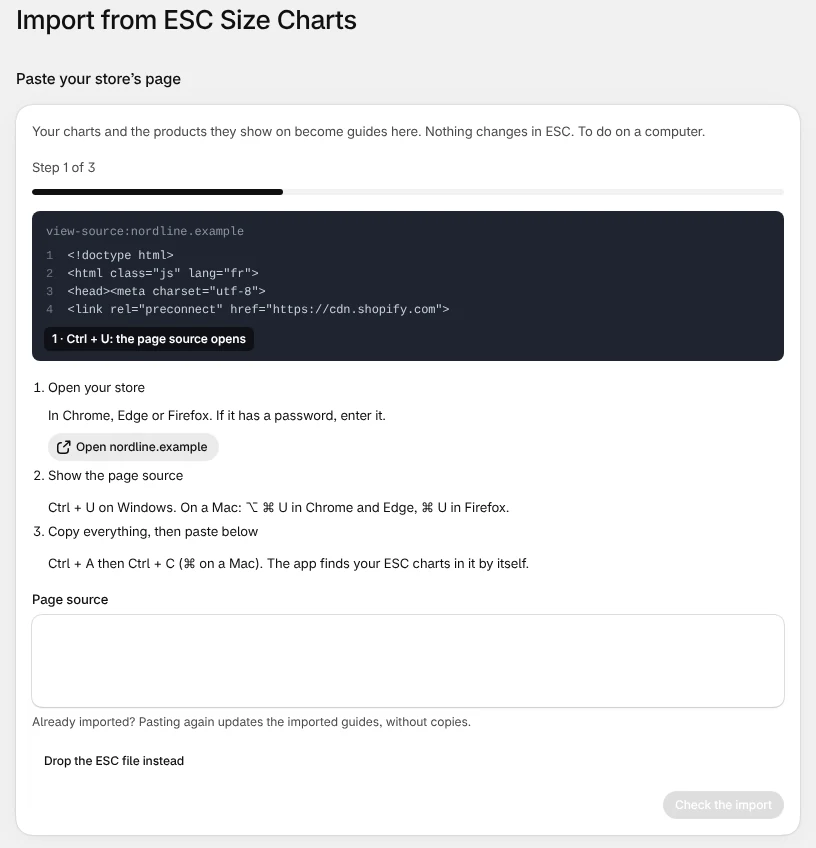
Nothing changes in ESC during the import, and the last import can be undone.
What moves over
| In ESC | After the import |
|---|---|
| Charts and their tables | Imported as guides, in plain text, up to 60 rows and 16 columns |
| Tags and product assignments | Imported: no product loses a chart that ESC showed on it; in a catalog of more than 5,000 products, the app checks the first 5,000 and says so |
| A chart shown on every product | Assigned to each product of your catalog; in a catalog of more than 250 products, the import stops (last row) |
| Sizes laid in columns over a single row of measurements | Turned upright, sizes in rows; you can keep the ESC layout |
| The guide image above or below a chart | Not imported |
| Some other ESC settings | Not imported |
| A chart that reaches more than 250 products one by one | The import stops so that no product loses a chart: write to contact@antwork.fr |
Why this app
- Your guides are stored in your store and shown by your theme: product pages make no request to our server.
- No watermark on your guides, on the Free plan too.
- A fixed price, monthly or annual, with no surcharge tied to your order volume.
- A size guide window built for keyboard and screen reader use (WCAG 2.2 AA).
- Storefront in English, French, German, Spanish, Italian and Dutch, with labels you can edit in each language.
- Free plan: 3 active guides with every feature, the import included. Pro: unlimited guides, 14-day free trial. Prices are on the App Store listing.
Questions
I have more than 3 charts and stay on the Free plan
The Free plan does not limit the import. Up to three guides are active and the others are kept inactive, without being deleted. You pick the active ones; Pro activates them all.
The app does not find my ESC charts
Copy the home page source of the store where ESC is installed, all of it, and paste it again. If you saved the ESC file, drop it instead.
Can I go back?
Yes. The last import can be undone: the guides it created are deleted, and the ones it updated get their earlier content back, unless there was too much of it to keep. ESC is never changed by the import.
Get Antwork Size Chart on the Shopify App Store
ESC Size Charts is a product of Eastside Co. Antwork is not affiliated with or endorsed by Eastside Co or Shopify.